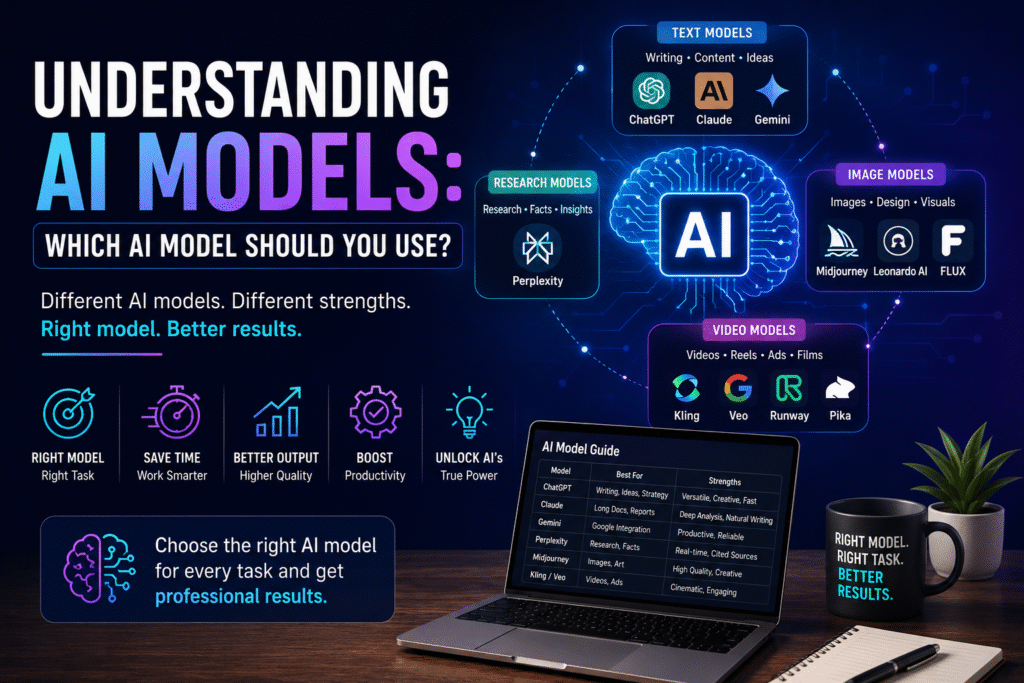
Understanding AI models is one of the first skills every AI user should master. Many beginners believe that every AI platform works the same way, but that’s one of the biggest misconceptions about Artificial Intelligence.
Just as you wouldn’t use Photoshop to build a website or Excel to edit a video, you shouldn’t rely on one AI model for every task.
Each AI model is designed with different strengths, capabilities, and use cases. Choosing the right AI model for the right task can save time, improve quality, and significantly boost productivity.
In this guide, you’ll learn how AI models work, the different types available today, and how to choose the best AI model for your business, marketing, or creative projects.
What Is an AI Model?
An AI model is a trained Artificial Intelligence system capable of understanding instructions, processing information, generating content, solving problems, and creating different types of media.
Depending on how they are trained, AI models specialize in different areas such as:
- Writing
- Research
- Coding
- Image Generation
- Video Creation
- Data Analysis
- Automation
- Customer Support
Instead of thinking of AI as a single tool, think of it as a team of specialists, where each member has unique strengths.
Why Understanding AI Models Matters
Many users make the mistake of using the same AI tool for every task.
Professional marketers, designers, and business owners choose different AI models based on the outcome they want.
Choosing the right model helps you:
- Improve output quality
- Save valuable time
- Reduce manual editing
- Increase productivity
- Achieve better business results
- Build efficient AI workflows
The more you understand AI models, the smarter your workflow becomes.
Best AI Models Every Professional Should Know
ChatGPT
ChatGPT is one of the most versatile AI assistants available today and is widely used across industries.
Best For
- Content Writing
- Marketing Strategy
- SEO
- Copywriting
- Brainstorming
- Prompt Engineering
- Coding
- Business Planning
Strengths
- Excellent reasoning
- High-quality writing
- Creative content generation
- Marketing strategy development
- Versatile across multiple business tasks
Claude
Claude is designed for handling long-form content and complex documents with remarkable clarity.
Best For
- Long-form writing
- PDF analysis
- Research
- Documentation
- Reports
- Knowledge management
Strengths
- Excellent document understanding
- Natural writing style
- Strong analytical thinking
- Handles large amounts of information efficiently
Gemini
Gemini integrates deeply with Google’s ecosystem, making it an excellent productivity assistant.
Best For
- Google Workspace
- Gmail
- Google Docs
- Google Sheets
- Research
- Daily productivity
Strengths
- Excellent integration with Google services
- Fast information retrieval
- Productivity-focused workflow
- Simple everyday assistance
Perplexity
Perplexity is designed primarily for research and fact-based information retrieval.
Best For
- Web Research
- Competitor Analysis
- Fact Checking
- Market Research
- Industry Trends
- Source Verification
Strengths
- Real-time internet access
- Cited information
- Reliable research
- Excellent for validating marketing claims
Types of AI Models
Not every AI creates the same type of content.
Understanding these categories helps you build an effective AI toolkit.
Text Generation AI Models
Text models specialize in generating written content.
Common Use Cases
- Blog Writing
- Website Content
- Email Marketing
- Social Media Posts
- Product Descriptions
- SEO Articles
- Reports
- Business Proposals
Popular Text AI Models
- ChatGPT
- Claude
- Gemini
These models are ideal for marketers, copywriters, bloggers, and businesses.
AI Image Generation Models
Image models create realistic visuals and marketing creatives using text prompts.
Common Use Cases
- Product Photography
- Social Media Creatives
- Advertisements
- Posters
- Branding
- Mockups
- Illustrations
- Marketing Campaigns
Popular Image AI Models
- Midjourney
- Leonardo AI
- Ideogram
- FLUX
- Adobe Firefly
These models are commonly used by designers, advertisers, and creative agencies.
AI Video Generation Models
Video AI models generate cinematic videos, advertisements, and social media content from text prompts.
Common Use Cases
- Commercial Advertisements
- Instagram Reels
- YouTube Shorts
- UGC Videos
- Product Videos
- Explainer Videos
- Brand Films
- Marketing Campaigns
Popular Video AI Models
- Kling
- Veo
- Runway
- Pika
Video generation has become one of the fastest-growing applications of AI in digital marketing.
How to Choose the Right AI Model
Before opening any AI platform, ask yourself one simple question:
“What am I trying to accomplish?”
Your task determines the best AI model.
Writing a blog, choose a text model.
Researching competitors, choose a research-focused model.
Designing advertisements, choose an image generation model.
Producing social media reels, choose a video generation model.
Choosing the right AI from the beginning improves both speed and quality.
A Real Marketing Workflow Using Multiple AI Models
Imagine you’re launching a new clothing brand.
Instead of relying on a single AI platform, you could create an AI-powered workflow like this:
| Task | Recommended AI Model |
|---|---|
| Market Research | Perplexity |
| Content Strategy | ChatGPT |
| Long-form Brand Story | Claude |
| Product Images | Leonardo AI |
| Premium Advertising Visuals | Midjourney |
| Promotional Videos | Kling or Veo |
| Presentation Design | Canva AI |
This approach allows each AI model to perform the task it does best.
Build an AI Toolkit, Not AI Dependence
One of the biggest mistakes beginners make is depending entirely on one AI platform.
Professional marketers build an AI toolkit instead.
A strong toolkit combines:
- Writing AI
- Research AI
- Image AI
- Video AI
- Automation AI
- Presentation AI
Each tool complements the others and creates a much more efficient workflow.
Best Practices for Using AI Models
To maximize productivity:
- Choose the right model for the task.
- Learn the strengths of each AI platform.
- Combine multiple AI tools in one workflow.
- Verify important information.
- Continue experimenting with new AI models as technology evolves.
The goal is not to master every AI tool, but to understand when and where each tool performs best.
Key Takeaways
- Every AI model has different strengths.
- No single AI tool is best for every task.
- Professional marketers combine multiple AI models.
- Building an AI toolkit increases productivity.
- Understanding AI models helps you produce better results faster.
Conclusion
Understanding AI models is one of the most important foundations of working with Artificial Intelligence.
Instead of searching for the “best AI tool,” focus on choosing the right AI model for each specific task.
Whether you’re writing blogs, researching competitors, designing advertisements, or creating videos, selecting the appropriate AI model will dramatically improve both efficiency and quality.
The future belongs to professionals who understand not only how to use AI—but also which AI to use at the right time.
Frequently Asked Questions
What is an AI model?
An AI model is a trained Artificial Intelligence system that performs specific tasks such as writing, researching, generating images, creating videos, coding, or analyzing data.
Which AI model is best for digital marketing?
There is no single best model. ChatGPT works well for content creation, Claude excels at long documents, Perplexity is ideal for research, while Midjourney, Leonardo AI, Kling, and Veo are excellent for creative tasks.
Why should I use multiple AI models?
Different AI models specialize in different tasks. Using the right model improves efficiency, quality, and overall productivity.
Which AI model is best for research?
Perplexity is widely used for web research, competitor analysis, fact-checking, and accessing current information with cited sources.
Can beginners learn multiple AI models?
Yes. Start by learning one model for writing, one for research, one for images, and one for videos. Gradually build a toolkit based on your workflow and professional needs.